RuneTwisting

A Runepriest guide for Warhammer Online.

Showing posts with label ui. Show all posts

Thursday, 8 July 2010

Setting up your UI to heal with click casting

One of the most fundamental improvements to my healing was when I moved over to click casting with my mouse instead of my keyboard.

The advantages are the reduction of just a button click, but with the amount of healing going out those button clicks soon add up. That first heal lands fractionally quicker allowing you to save more lives.

When I first started in Warhammer I went straight to Squared. You can set it up to take all your spells with different combinations of CTRL, ALT, SHIFT and your left mouse button. Unfortunatly there's not the same functionality as in WoW where you can also use keybinds when your mouse is hovering over your unitframes. I've added a few extra addons to enhance Squared:
  • SquaredHDIndicator shows you when your target has a heal debuff. Purple 25%, Black 50% and Orange is an outgoing debuff. 
  • SquaredHOTIndicators allows you to view what length of HOT you have on your target. This allows you to see when you have Rune of Regeneration up (default green) and Rune of Serenity (default yellow).
  • LibRange & RangeFadingSquared featured in my previous post. This improves the fading functionality of Squared when your group members are out of range. Remember to untick 'Enable range/LOS fade' under Misc Options when installing this.
I've also changed the style of Squared from the default as seen on the right to the one below. Choose and adjust to suit yourself, there are other examples on the Squared website here.You can easily adjust to this functionality by opening the Squared configuration, going to Import/Export and pasting in this code:

icon-offset-x:n:-19|color-hpbars:b:true|direction-member:s:down|leaderbordercolor:t:156,156,189|hot-color2:t:255,0,0|color-hpnames:b:true|boxheight:n:30|colorgroup-msupp:t:110,255,178|bordersize:n:3|hot-color1:t:0,255,0|groupbordercolor:t:100,100,150|spacing-member:n:6|icon-alpha:n:1|texture-border:s:squared_border_1|boxwidth:n:85|colorgroup-hpdead:t:40,0,0|hd-color1:t:190,0,128|colorgroup-rmdps:t:251,227,60|testmode:b:true|hd-color2:t:0,0,0|text-position-level:s:top|hd-color3:t:255,128,64|texture-background:s:squared_bar_3|hot-color4:t:255,255,255|colorgroup-tank:t:218,218,255|bordercolor:t:0,0,0|hp-low:n:20|meep:n:2|update-freq:n:0.3|rangefading:b:false|icon-position:s:left|fgcolor:t:0,188,0|color-classbars:b:true|colorgroup-rsupp:t:189,255,0|text-position-hp:s:bottom|hot-color3:t:255,255,0|direction-group:s:right|text-align-top:s:bottomleft|status-buff:s:none|spacing-column:n:160|color-hpborders:b:true|texture-offline:s:tint_square|icon-scale:n:0.8|text-align-bottom:s:rightcenter|namelength:n:10|colorgroup-rpdps:t:233,194,0|text-align-center:s:bottom|status-hot:s:topright|columnsize:n:4|spacing-group:n:25|text-font-top:s:font_clear_tiny|texture-foreground:s:squared_bar_6|status-debuff:s:bottomleft|direction-fill:s:right


You may wish to read the whole article before you set the keybinds in this section:
  • Click - Grungni's Gift
  • CTRL + Click - Rune of Regeneration (if you use a lot of RoR you may wish to move this to an ALT click to work your thumb instead of your little finger).
  • SHIFT + Click - Rune of Cleansing
  • ALT + Click - Rune of Shielding
  • ALT + SHIFT + Click - Rune of Serenity
  • CTRL + ALT + Click - Protection of the Ancestor's
  • Z - Rune of Restoration
  • SHIFT + CTRL - Rune of Mending (again I never cast this and thus it is on an awkward key combination)
  • Blessing of Valaya, for those of you are interested, is bound to a nice spammable C key
The main issue I had with using a vanilla Squared is whenever someone was out of LOS or out of range it would self-cast the spell. Often in the heat of battle I would have fired off two Grungni's Gifts on myself before I realised they weren't landing on their intended target. Back then, at 30AP a pop it wasn't doing much for my AP pool! The only way I found to get round this was to install NerfedButtons and bind all my heals through NBSquared. Instead of the first cast instantly landing on click, that first click selects my target. I lose a bit of efficiency as I have to double tap my target for the first heal but I thought this a small price to pay for not crippling my AP. If anyone knows another way to prevent War self-casting in these situations please let me know.

You can load up the NerfedButtons ui with /nb ui. Drag your spells from your abilities menu (shortcut key V) and save. Make sure you have choose addon 'NBSquared' and type in n for a normal mouse click; s for shift click; sa for shift alt; sac for shift alt control; etc.

Now there's no need to do any fancy-pants checking using NerfedButtons, you can if you want to but it's beyond the scope of this guide. One little addition I have enjoyed is to add Rune Of Life to the cast list with Rune of Cleansing on shift click. This just gives you the ability to shift-click on a dead player in battle to rez them.

I'd like to go on to bind Divine Favour to a cast but I've run out of key combinations. Maybe I should replace Rune of Mending...

I hope this helps anyone who hasn't yet moved over to this way of casting, although I'm sure the majority already have. There are a couple of other mods that allow you to do this: Enemy and HealGrid. If you can't get Squared how you like it, try out either of these two mods! Finally if you're not convinced, here's a short example video showing you how you can stay mobile and heal at the same time:


Friday, 25 June 2010

UI Add-on Developments - Unitframes and Range

Recently I've been noticing some devent improvements in UI add-ons being released for Warhammer. Two of note to the Runepriest are more accurate range finding mods: GroupRange and libRange.

GroupRange is an add-on which will display the distance of your groupmates from you, apparently accurate to +-10 every 100 feet. Whilst this may not at first sound that useful you have to recall the power of Blessing of Valaya. Without requiring LOS you can find a nice hidden corner to heal your group from. Often I have been running through the steamtank to see my group member's icon through the wall. I had no idea how far they were but now I know as soon as I'm in range to start group healing them.


You can see a group list with ranges in Red/Green to the left of my Healthbar. Also if you look to the White Lion in the top right he has a green 75 indicating his range. There are about four different options for displaying the range - these are just two.

libRange is another parallel line of development, creating the same underlying functionality as GroupRange but without a frontend. Fortunatly the mod developer has created features for Squared that allow it to take advantage of the more accurate range finding. It will now fade more accurately when members are out of LOS and out of range. You will need to disable Squared's own LOS/Fade under Misc Options.

Finally, Enemy, this has been around for a while now, has excellent Group Icons, Assists, UnitFrames, KillStats and more. Recently the author has added mouse click functionality to the UnitFrames to allow click casting of abilities like Squared. The effects indicators on Enemy are really good, better than Squared for the most part so it is definitly worth considering switching over.


Finally I've started creating pages leading towards a Runepriest guide on the righthand side. I've started off with a rundown of the Mastery Paths and will add more as time goes on. Please feel free to leave any comments or suggestions!

Tuesday, 4 May 2010

Must have UI add-ons for your Runepriest

I was a bit disappointed by the  amount of add-ons available to Warhammer coming from World of Warcraft. And what really annoyed me was the inability to cast spells on mouseover targets, or to use the right, middle, fwd/backwards buttons on the mouse to cast.

Below is a quick list of all the indispensible addons I have found, roughly in order of priority:
  • Squared - Shows all group and warband members in a customisable unit frame, allows for quick overview of health to allow you to prioritise your healing targets.
  • SquaredClick - Allows you to click with your mouse on Squared to cast heals, can combine CTRL, ALT, SHIFT for more combinations.
  • Detaunt Helper - Shows the target that is DPSing you the most and allows you to cast your detaunt (50% damage reduction in PvP) on that target. See previous blog for more information on configuring this add-on.
  • NerfedButtons - Allows you to script buttons. Some people say it's too automatic and shouldn't be used. It is written inline with all the UI tools and Mythic have no issue with the add-on. I plan to post more detail about how I have configured this later.
  • NBSquared - Allows you to combine NerfedButtons functionality with Squared.
  • AutoDismount - AutoDismounts you when casting.
  • MarkBuff - Allows you to buff your group easily.
  • NoOverheal - Helps prevent casting of spells if target is on full health.
  • Res - Sends text to your chat channel when you Res a target.
All available with through Curse.

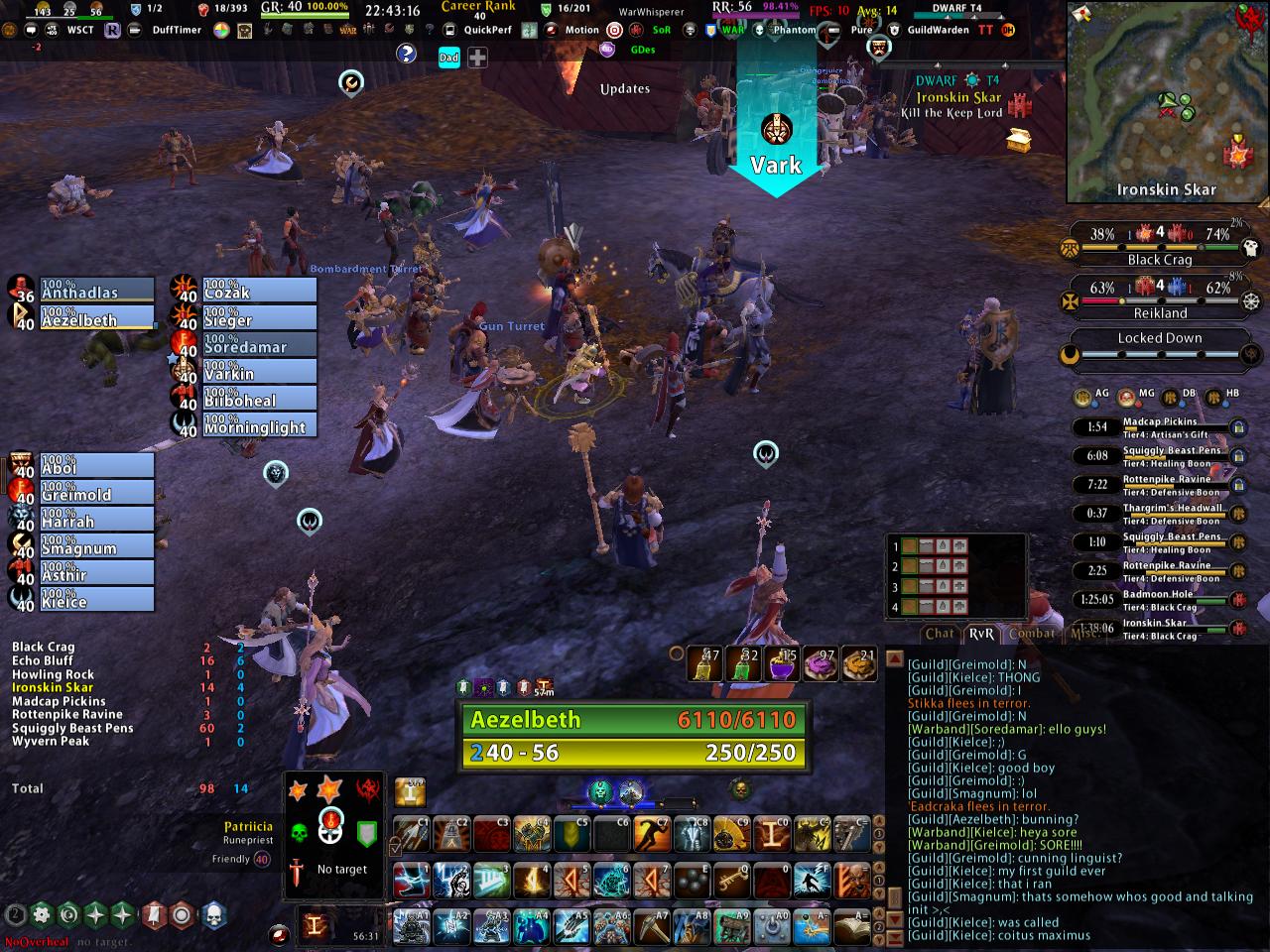
At a later date I will expand more on my UI with screenshots.

There are many more you will want to try to adjust the layout of your interface, these are the ones that I have found that I think specifically apply to the Runepriest.

Aezelbeth
Karak-Azgal EU

Detaunt Helper - Configuring for your Runepriest

Detaunt Helper is an excellent add-on that enables you to use Rune of Preservation effectively in PVE or PVP. It can be configured using the command /dh menu.

It's default settings shows bars of the most DPS players/NPCs attacking you. These are clickable allowing you to target that enemy. For players you can assign a mouse click to cast Rune of Preservation or any other spell you desire. For NPCs this function is disabled to prevent botting but you can still cast manually after targetting.

I set the list to display only 2 bars, 5 seconds to delay expiration and unticked Reset on Detaunt.


I initially started using the bars but found that in the heat of RvR combat it was preventing me from doing other things so I looked at a way to keybind the functionality. To do this I had to install NerfedButtons and create a simple script:
/nb add 9 [Rune Of Preservation];dht:+
This adds the spell [Rune of Preservation] to hotbar key 9, and will only cast the spell if your target is equal to the Detaunt Helper Target (dht).

Now we need to use a macro to target the DHT if he/she isn't your current target. To create a macro we use the Escape menu and then select Macros:
We create a new macro, give it a title, an icon and add the following script:
/script DetauntHelper.TargetTop()

 We combine the macro to the NerfedButton with the command:
/nb macro 9 1
Where 9 is the hotbar key assigned earlier, and 1 is the macro you have created. The macros are numbered 1-x - the first macro you create will be assigned to 1, the second to 2 etc...


Finally to put the spell on a more usable key use the Escape menu to get to Key Mapping, select Hotbars and assign a key to that hotbar #. Personally I chose E which is next to my movement keys and easily accessible.

With two taps of the E key I will cast my Detaunt on the highest DPS enemy at the time. Win.

Aezelbeth
Karak-Azgal EU